
MULTIFUNCTIONAL FLASHER TIMER
Model RT6-D10-U
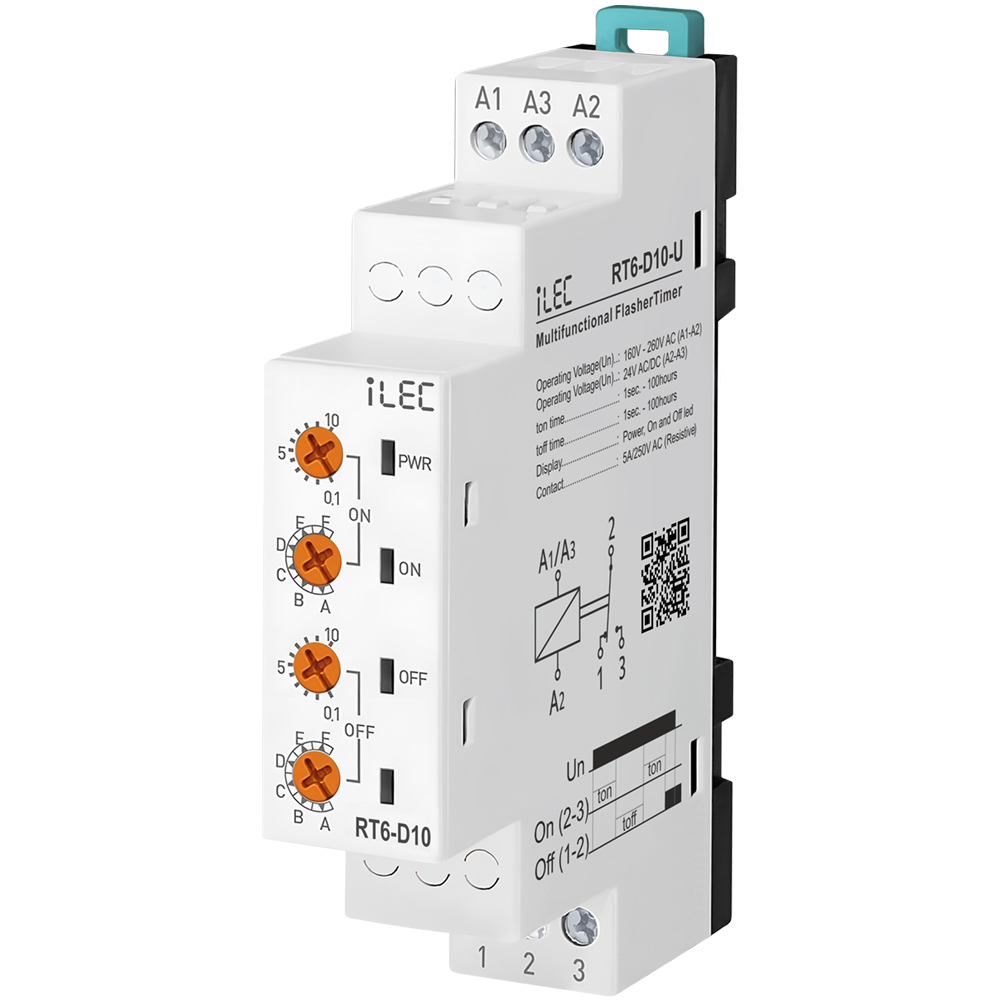
IntroductionRT6-D10-U flasher relays are designed for every usage (industry, house, plant etc..) which needs double timing controll. |
 |
Specifications
| PARAMETER | VALUE |
| Operating voltage (Un) | AC 160V–260V (A1-A2); AC/DC 24V (A3-A4) |
| Operating frequency | 50/60Hz |
| Operating power | < 6VA |
| Operating temperature | -20ºC ~ 55ºC |
| Ton time | 1sec – 100hrs |
| Toff time | 1sec – 100hrs |
| Display | Power, On and Off led |
| Connection type | Terminal connection |
| Weight | max. 110 gr. |
| Contact | 5A/250V AC (Resister Load) |
| Mounting | Vertical assembled on the panel (or on the DIN rail) |
| Operating Altitude | < 2000m |
| Cable diameter | 1.5 mm² |
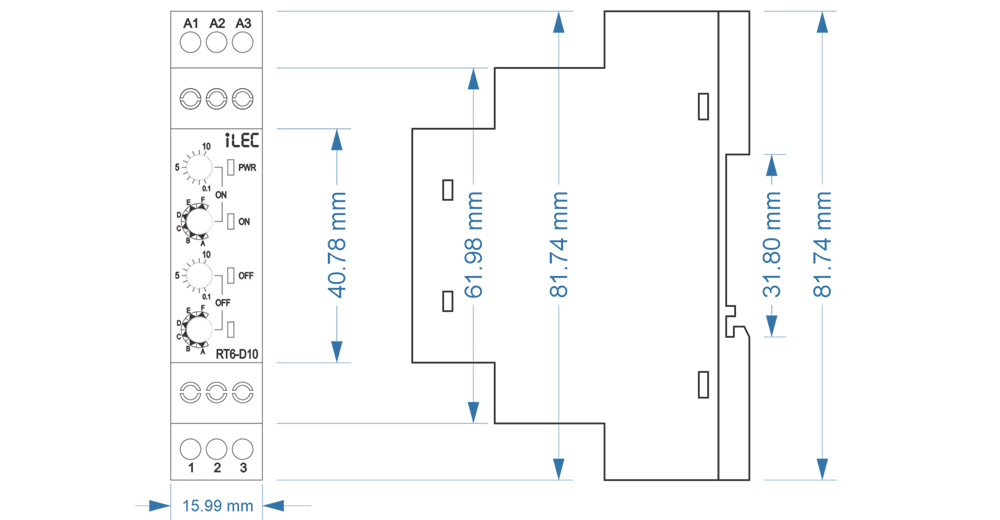
Dimension
Device Usage and Working Principle
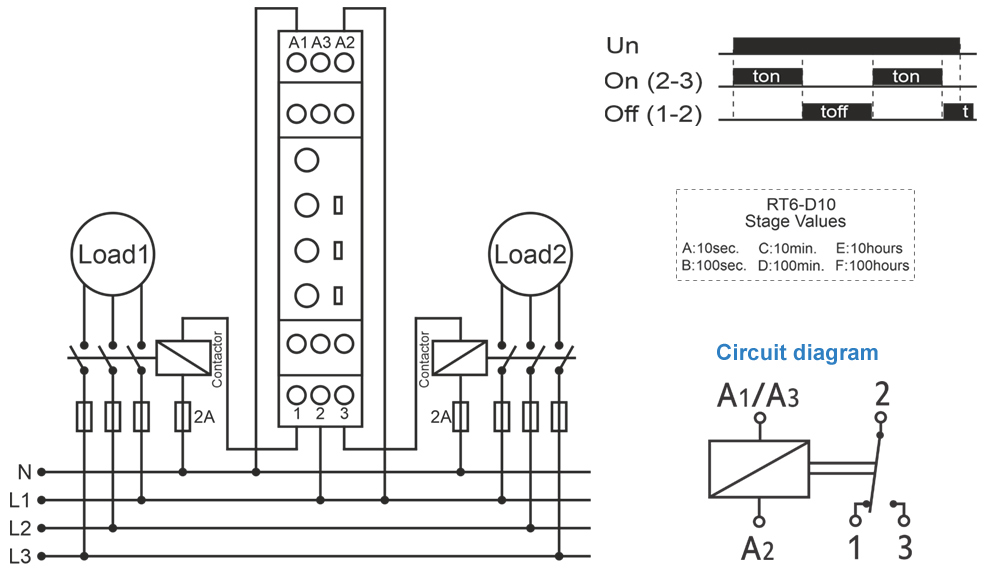
- Make the connections according to the diagram.
- Max.On Time: Sets the stage of “on” and display the maximum “on” time.
- Max.Off Time: Sets the stage of “off” and display the maximum “off” time.
- ton: Divides the “on” time by 10 and multiples by displayed value.
- toff: Divides the “off” time by 10 and multiples by displayed value.
- Turn on the stage button to 100m and ton button between 7-8. “On” time will be adjusted to 75 minutes.
- Turn off the stage button to 100s and toff button to 6. “Off” time will be adjusted to 60 seconds.
- Turn on the “on” stage button to 10s. and “ton” button between 7-8. Power on the device and check for 7.5 seconds with chronometer. If it is high or low, re-set “ton”.
- Power on and check again. Later, turn on the “on” stage button to 10h, in this case “on” time will be much sensitive.
- Turn on the “off” stage button to 10s. and “toff” button to 5. Power off the device and check for 5 seconds with chronometer.
* Example: Working time(on) is 75minutes, waiting time (off) is 60seconds.
* Note: In order to adjust much sensitive higher time values, set “t” by chronometer in low stages and increase the stage to the time required.
* Example: Working time (on) 7,5 hours and waiting time (off) is 50 minutes.
If it is high or low, re-set “toff”. Power on and check again. Later, turn off the “off stage button to 100m, in this case “on” time will be much sensitive.
After time settings, power on the device. at the beginning, “on” time will count and “on” led will flash. While counting, relay contact out is (NO) 3 pole.
When the counting finishes, “off” time will start to count and off led flashes. While counting “off” time, relay contact out is (NC) 1 pole.
Till the power is off, device keeps counting on and off times in turn.
Typical Connection Diagram
Maintenance
- Switch off the device and release from connections.
- Clean the trunk of device with a swab.
- Don’t use any conductor or chemical might damage the device.
- Make sure device works after cleaning.
Warnings
- Please use the device according to the manual.
- Don’t use the device in wet.
- Include a switch and circuit breaker in the assembly.
- Put the switch and circuit breaker nearby the device, operator can reach easily.
- Mark the switch and circuit breaker as releasing connection for device.
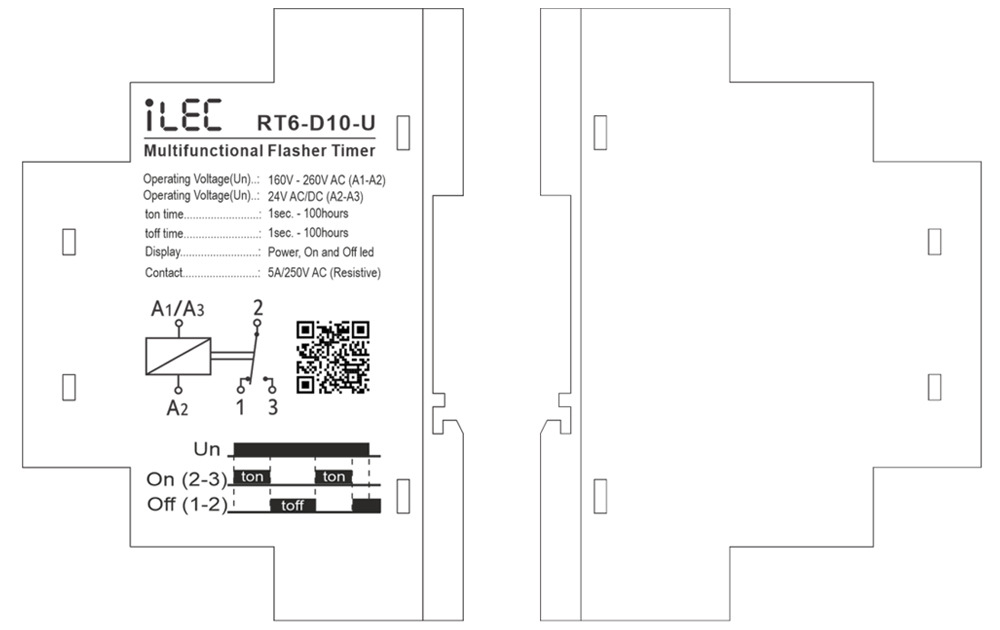
External description
Resources & Support
- Technical documents – Model RT6-D10-U
- Reference Articles – Model RT6-D10-U
- Pricing & Ordering – Model RT6-D10-U
Review Relay iLEC RT6-S10-U
- Details
- Parent Category: product
- Category: Multifunction Protection Relay
MULTIRANGE ON DELAY TIMER RELAY
Model RT6-S10-U
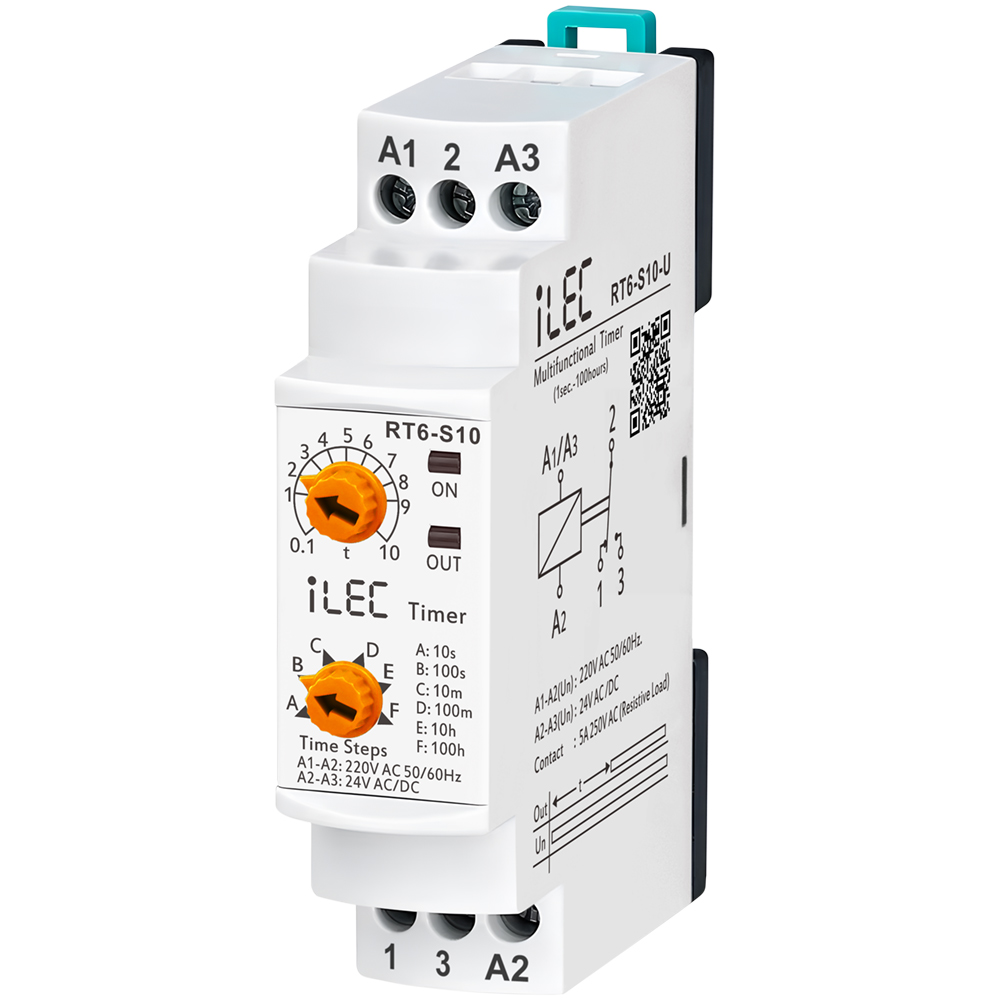
IntroductionRT6-S10 and RT6M-S10 timer relays are used in all fields (industry, house, plant etc.) need controlls related to the time. |
 |
Specifications
| PARAMETER | VALUE |
| Operating voltage (Un) | AC 150V–260V and AC/DC 24V |
| Operating frequency | 50/60Hz |
| Operating power | < 4VA |
| Operating temperature | -20ºC ~ 55ºC |
| Timer (t) | 10sec, 100sec, 10min, 100min, 10hrs, 100hrs |
| Display | On led and Out (RLY ) led |
| Connection type | Terminal connection |
| Weight | max. 120 gr. |
| Contact | 5A/250V AC (Resister Load) |
| Mounting | Assembled on the DIN rail |
| Operating Altitude | < 2000m |
| Cable diameter | 1.5 mm² |
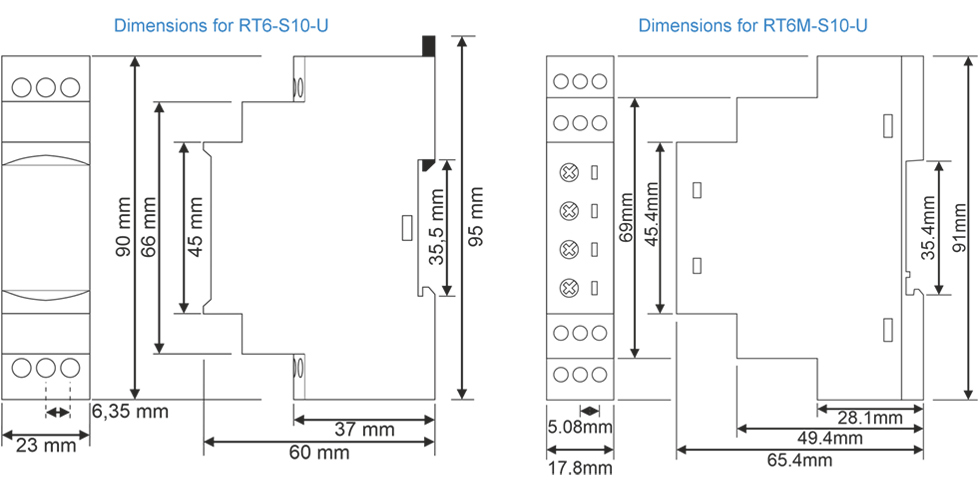
Dimension
Usage of Device and Working Principle
- Make the connections according to the diagram.
- Max.Time (Time Steps, TS ): Adjusts the stage and display the max.time.
- [ t ]: Divides the stage by 10 and multiply with displaying value.
* Example: Time is 75 minutes. - Make stage button to 100m (100 minutes) and turn “t” button between 7-8. In this case time is adjusted to 75 minutes.
* Note: In order to adjust much sensitive higher time values, set “t” by chronometer in low stages and in crease the stage to the time required.
* Example: Time is 25 hours. - Turn stage button to 10s (10 seconds) and “t” button between 2-3. Make power on and check with a chronometer for 2.5 seconds.
- Make the stage button 100h(100 hours). In this case, you set it more sensitive.
- After setting the time, power on the device. Device will start timing and meanwhile led switches on-off.
When device is timing relay contact 2 shorted to 1.
When the timing finish (set time is up) relay led is switches on stable and contact 2 shorted to 3.
Device keeps stable till the power is off.
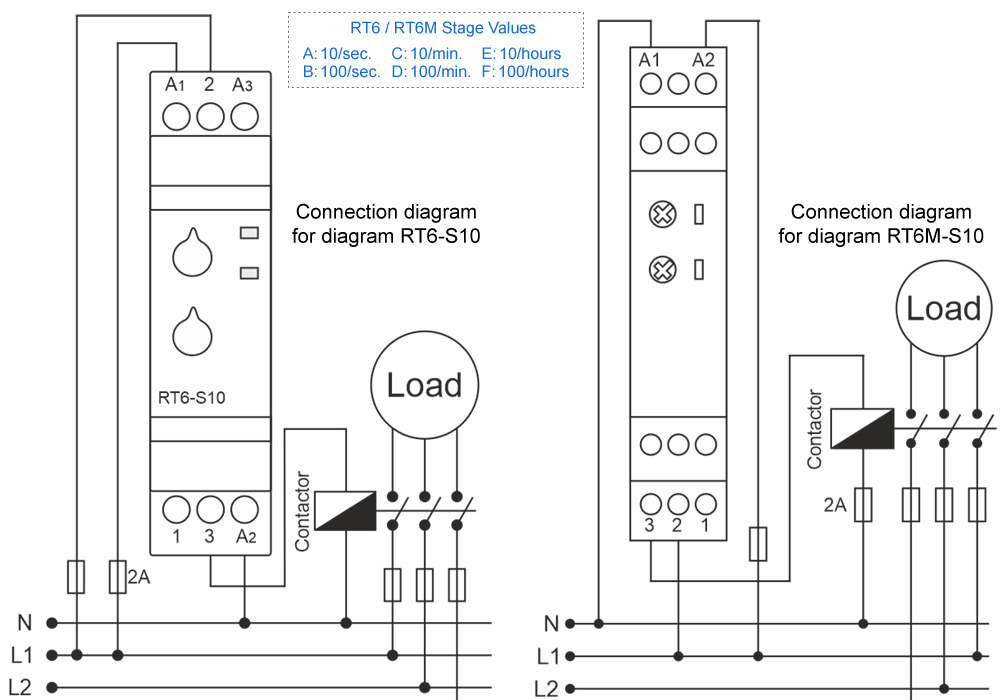
Typical Connection Diagram
Maintenance
- Switch off the device and release from connections.
- Clean the trunk of device with a swab.
- Don’t use any conductor or chemical might damage the device.
- Make sure device works after cleaning.
Warnings
- Please use the device according to the manual.
- Don’t use the device in wet.
- Include a switch and circuit breaker in the assembly.
- Put the switch and circuit breaker nearby the device, operator can reach easily.
- Mark the switch and circuit breaker as releasing connection for device.
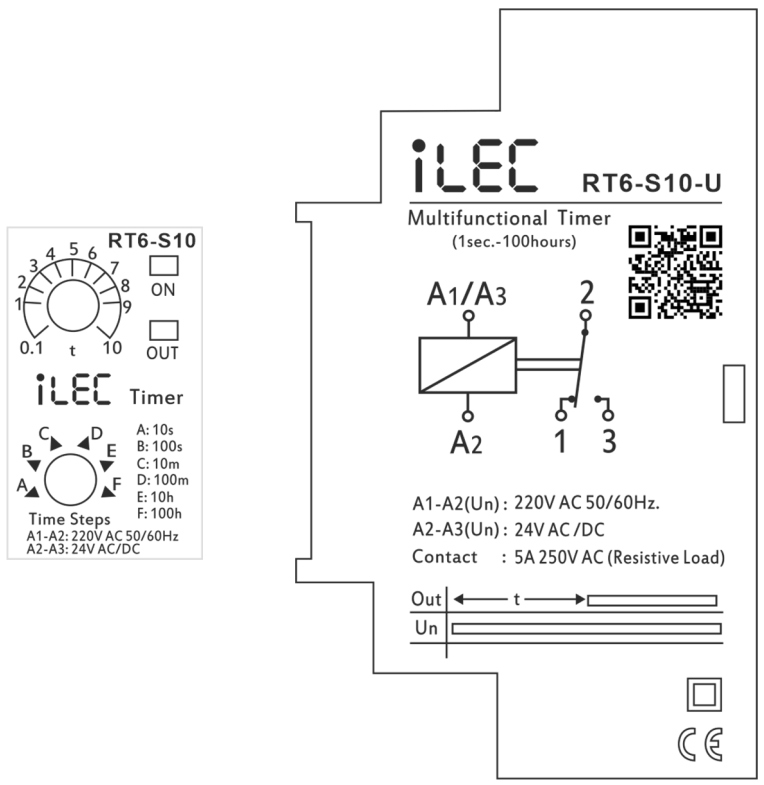
External description
Resources & Support
- Technical documents – Model RT6-S10-U
- Reference Articles – Model RT6-S10-U
- Pricing & Ordering – Model RT6-S10-U
Review Relay iLEC RT6-S10-U
- Details
- Parent Category: product
- Category: Multifunction Protection Relay
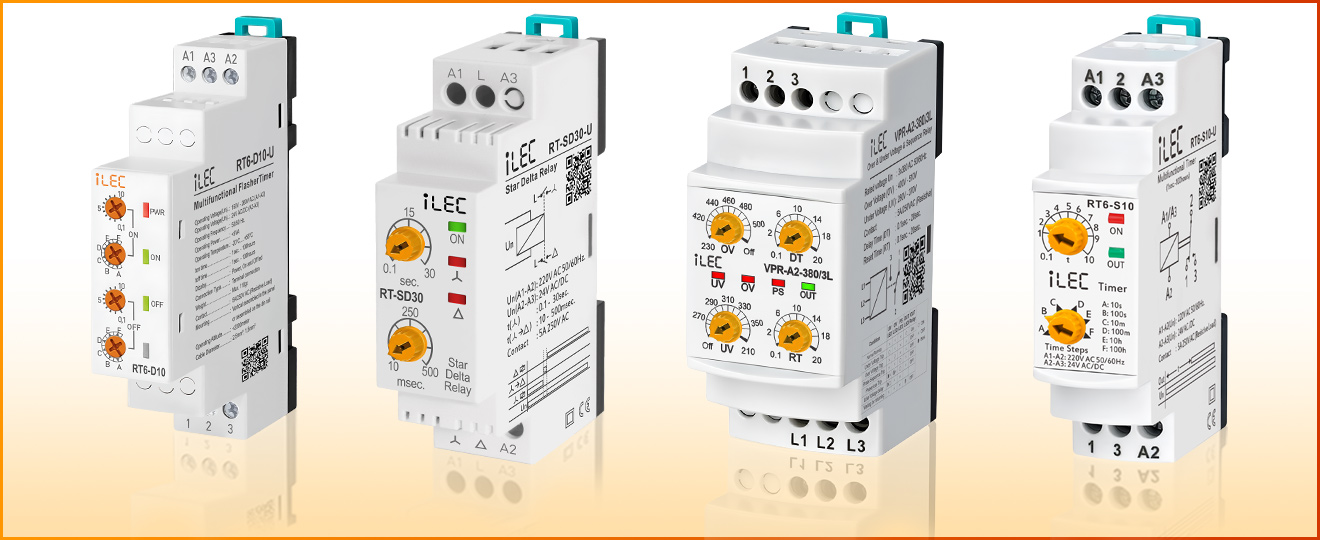
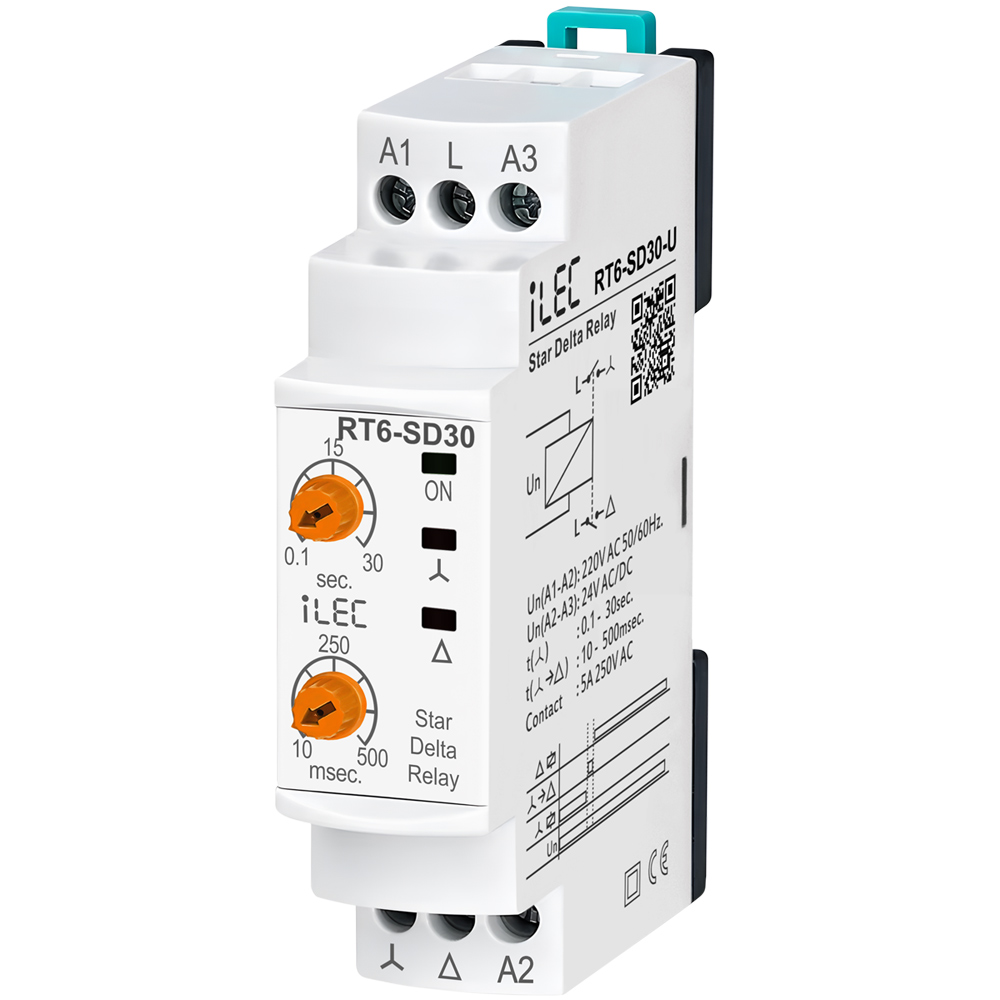
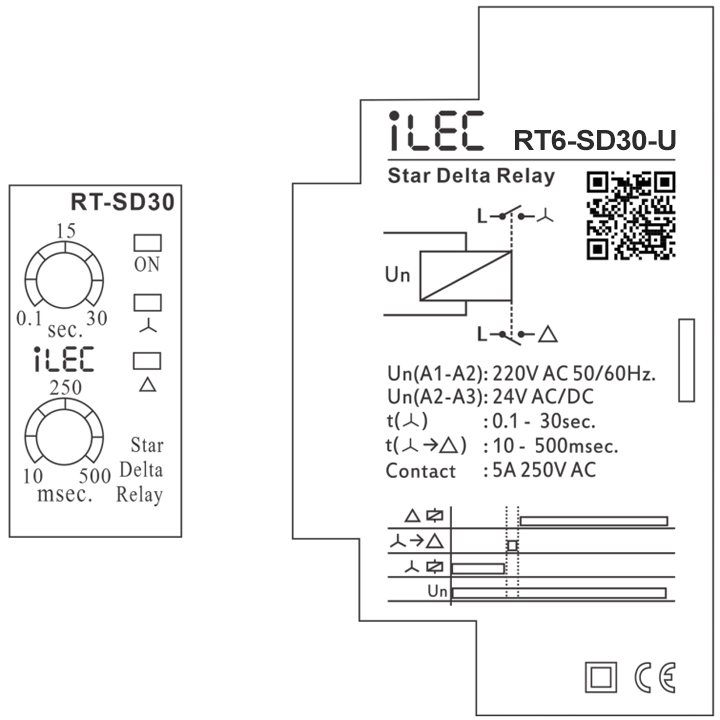
STAR DELTA RELAY
Model RT6-SD30-U
IntroductionStar Delta Relay is designed to controll three motors in the first run. |
 |
Specifications
| PARAMETER | VALUE |
| Operating voltage (Un) | AC 160V–260V (A1-A2); 24V AC/DC (A1-A3) |
| Operating frequency | 50/60Hz |
| Operating power | < 6VA |
| Operating temperature | -20ºC ~ 55ºC |
| Working (star) | 0.1sec. – 30sec. |
| Waiting (off) | 1msec. – 500msec. |
| Display | On led, star led and delta led |
| Connection type | Terminal connection |
| Weight | max. 110 gr. |
| Contact | 5A/250V AC (Resister Load) |
| Mounting | Assembled on the DIN rail |
| Operating Altitude | < 2000m |
| Cable diameter | 2.5 mm² |
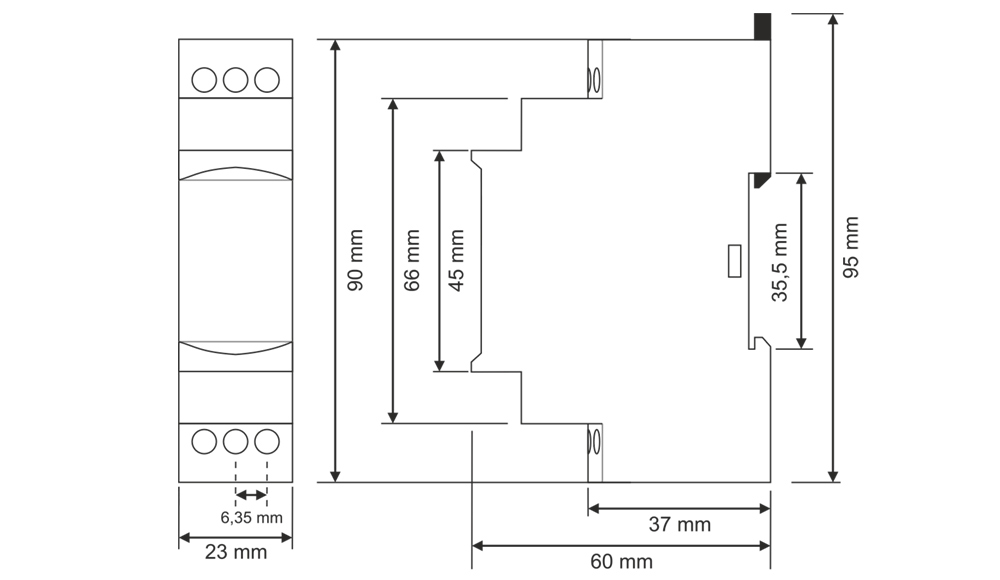
Dimension
Usage of Device and Working Principle
- Make the connections according to the diagram.
- Max.Time (Time Steps, TS ): Adjusts the stage and display the max.time.
- [ t ]: Divides the stage by 10 and multiply with displaying value.
* Example: Time is 75 minutes. - Make stage button to 100m (100 minutes) and turn “t” button between 7-8. In this case time is adjusted to 75 minutes.
* Note: In order to adjust much sensitive higher time values, set “t” by chronometer in low stages and in crease the stage to the time required.
* Example: Time is 25 hours. - Turn stage button to 10s (10 seconds) and “t” button between 2-3. Make power on and check with a chronometer for 2.5 seconds.
- Make the stage button 100h(100 hours). In this case, you set it more sensitive.
- After setting the time, power on the device. Device will start timing and meanwhile led switches on-off.
When device is timing relay contact 2 shorted to 1.
When the timing finish (set time is up) relay led is switches on stable and contact 2 shorted to 3.
Device keeps stable till the power is off.
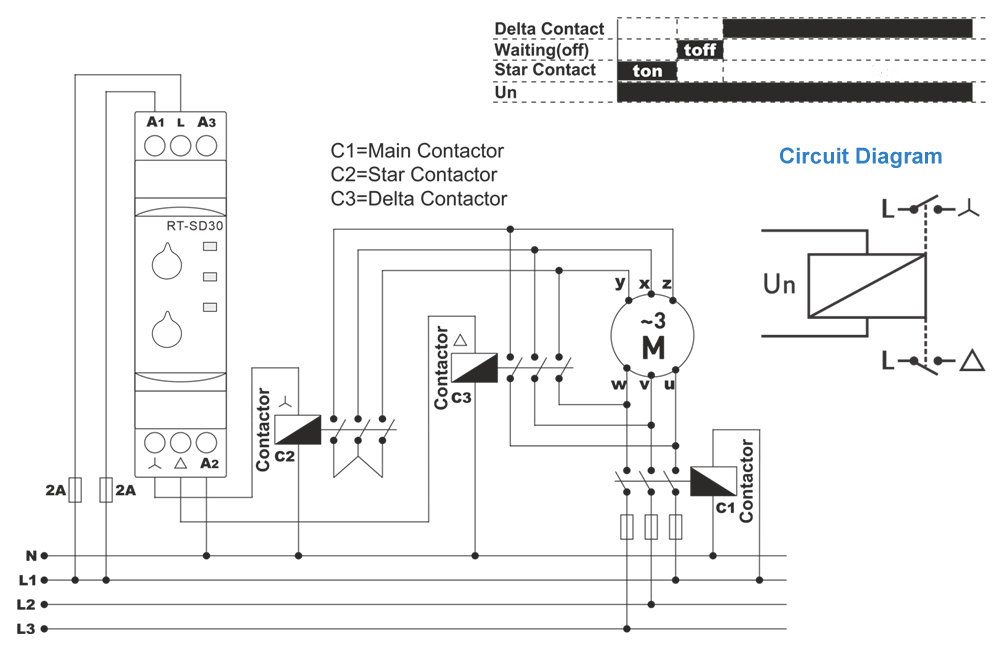
Typical Connection Diagram
Maintenance
- Switch off the device and release from connections.
- Clean the trunk of device with a swab.
- Don’t use any conductor or chemical might damage the device.
- Make sure device works after cleaning.
Warnings
- Please use the device according to the manual.
- Don’t use the device in wet.
- Include a switch and circuit breaker in the assembly.
- Put the switch and circuit breaker nearby the device, operator can reach easily.
- Mark the switch and circuit breaker as releasing connection for device.
External description
Resources & Support
- Technical documents – Model RT6-SD30-U
- Reference Articles – Model RT6-SD30-U
- Pricing & Ordering – Model RT6-SD30-U
Review Relay iLEC RT6-SD30-U
- Details
- Parent Category: product
- Category: Multifunction Protection Relay
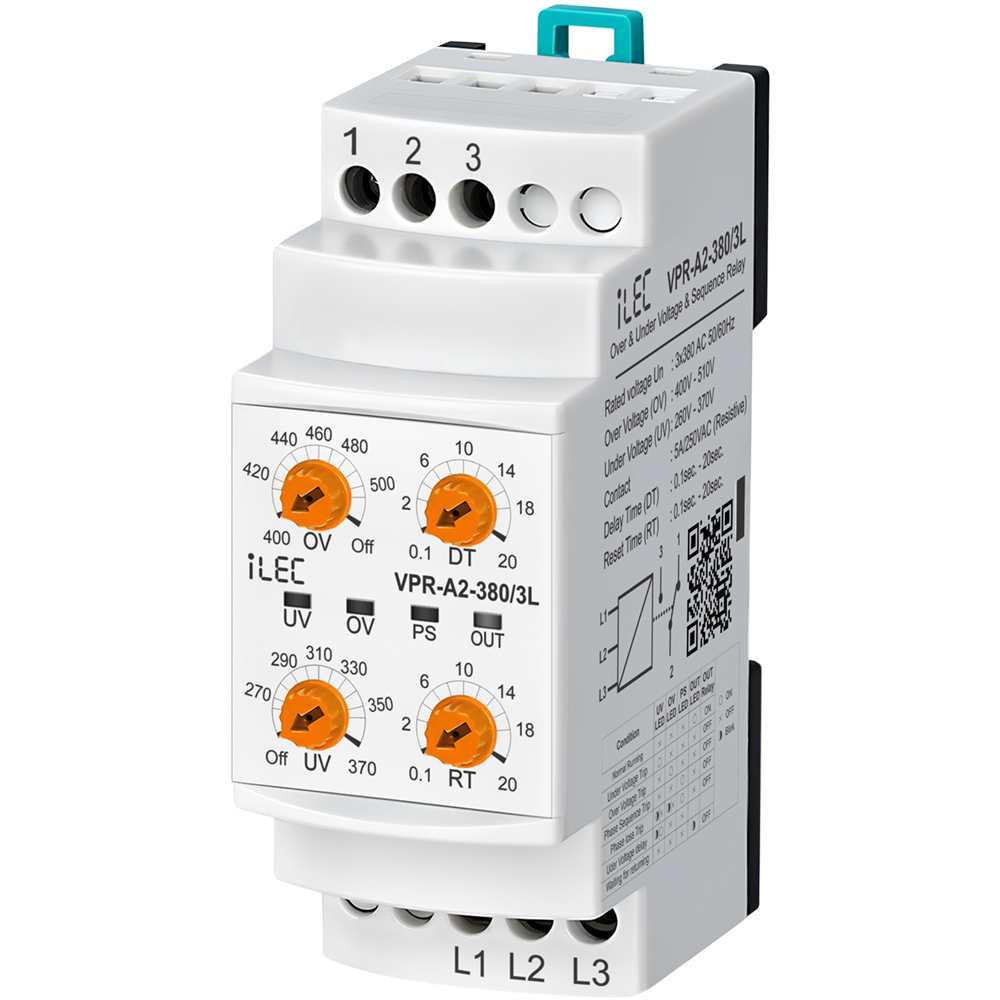
OVER/UNDER VOLTAGE & SEQUENCE RELAY
Model VPR-A2-380/3L
IntroductionVoltage control relays are designed to protect devices with sensitive operating voltage values from faults that may be caused by mains voltage. |
 |
Protection Functions
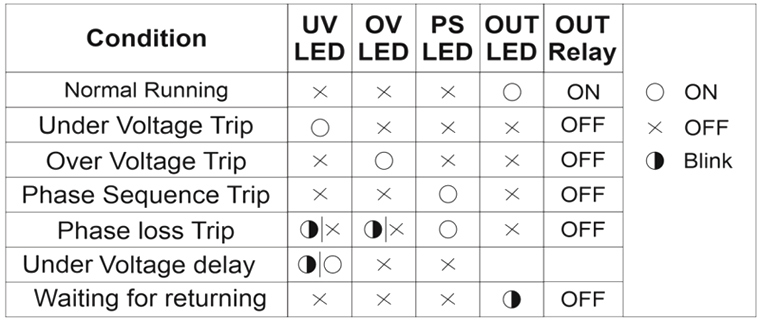
- Under Voltage Protection - To enter the error state: If one or more of the phases goes below the low voltage set value, the UV LED is on, the device waits until the set delay time (DT), after the time has elapsed the relay gets de-activated and the relay LED is off.
- Under Voltage Protection - Exiting the error state: When all phases goes above by 3% of the low voltage set value, the device waits for the reset time (RT). After the time passes, the UV LED is off, the relay gets activated and the relay LED is on.
- Over Voltage Protection - To enter the error state: If one or more of the phases goes above the high voltage set value, the OV LED is on, the device waits until the set delay time (DT), after the time has elapsed the relay gets deactivated and the relay OUT is off.
- Over Voltage Protection - Exiting the error state: When all phases drops below by 3% of the high voltage set value, the device waits for the reset time (RT). After the time passes, the OV LED is off, the relay gets deactivated and the relay LED is on.
- Phase Sequence Protection: If the phase sequence of the device is reversed, the phase sequence error PS LED will light up and the relay will not gets activated.
- Phase loss or Inadequate Supply Voltage Protection - To enter the error state: UV and OV LEDs flashes when voltage is lower than the nominal operating voltage by 0.4 times, after 100 millisecond the device gets deactivated the relay, and relay LED is turned off.
Specifications
| PARAMETER | VALUE |
| Operating voltage (Un) | 3 x 380V AC, 50/60Hz |
| Over Voltage set | 400V–510V |
| Inder voltage | 260V–370V |
| Delay time | 0.1sec. – 20sec. |
| Reset time | 0.1sec. – 20sec. |
| Operating Power | < 6VA |
| Operating temperature | -20ºC ~ 55ºC |
| Display | 4 x LEDs |
| Mounting type | Standard 35mm din ral |
| Weight | 210gr. |
| Contact | 5A 250VAC (Resister Load) |
| Operating Altitude | < 2000m |
| Panel hole size | < 91 x 91 (mm) |
| Cable size | 2.5mm² |
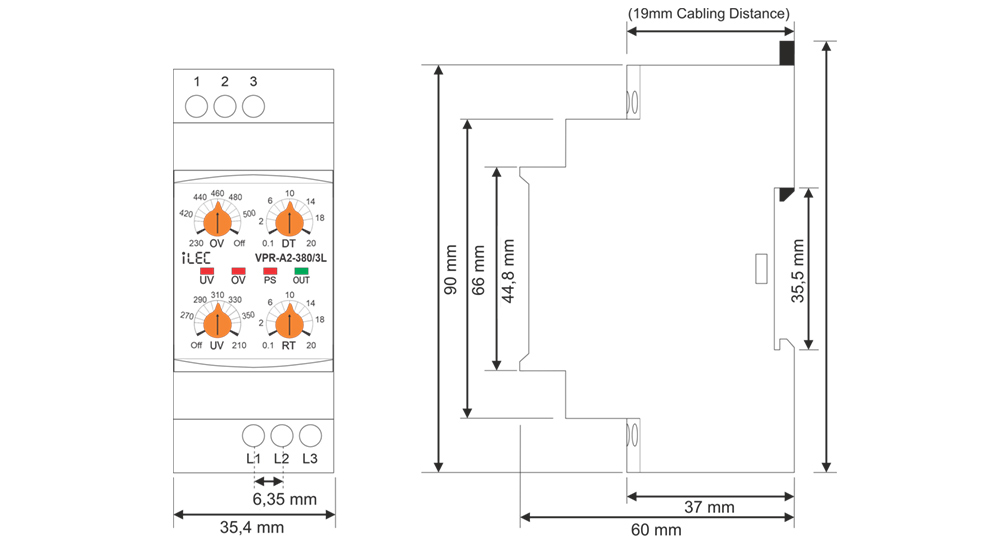
Dimension
Device Usage and Working Principle
- Make the connections of the device in accordance with connection scheme.
- Set the required settings of the device according to the operating voltage values of the load.
- When the device is energized, if the voltage values are normal according to the set values, the relay gets activated and the relay OUT LED is turned on.
- When the voltage values go out of the set values, the related fault LED is on, it waits until the delay time (DT), after the time has elapsed,
- When the voltages return to their normal values, the device waits until the reset time (RT), after the time has elapsed the relay gets activated and the relay LED is turned on.
- The Under Voltage Protection function is deactivated when the The Over Voltage Protection function is deactivated when the OV control knob is set to Off.
- Relay is Deactivated when no power supply or supply with errors 2 and 1 short circuit, 3 and 2 open circuit.
* (In the case of models with phase sequence control, the phase sequence must also be correct.)
the relay gets deactivated and the relay LED goes out.
Required Settings and Error Notifications
- UV: Under Voltage Set Value, when the voltage drops below this value, UV LED is on.
- OV: Over Voltage Set Value, when the voltage rises above this value, OV LED is on.
- DT: Delay Time, is the time to wait before entering the fault.
- RT: Reset Time, is the time to wait for the relay to pull when the voltages return to normal.
LED Notifications for errors
- UV: Under Voltage Set Value, when the voltage drops below this value, UV LED is on.
- OV: Over Voltage Set Value, when the voltage rises above this value, OV LED is on.
- DT: Delay Time, is the time to wait before entering the fault.
- RT: Reset Time, is the time to wait for the relay to pull when the voltages return to normal.
Maintenance
- Switch off the device and release from connections.
- Clean the trunk of device with a swab.
- Don’t use any conductor or chemical might damage the device.
- Make sure device works after cleaning.
Warnings
- Please use the device according to the manual.
- Don’t use the device in wet.
- Include a switch and circuit breaker in the assembly.
- Put the switch and circuit breaker nearby the device, operator can reach easily.
- Mark the switch and circuit breaker as releasing connection for device.
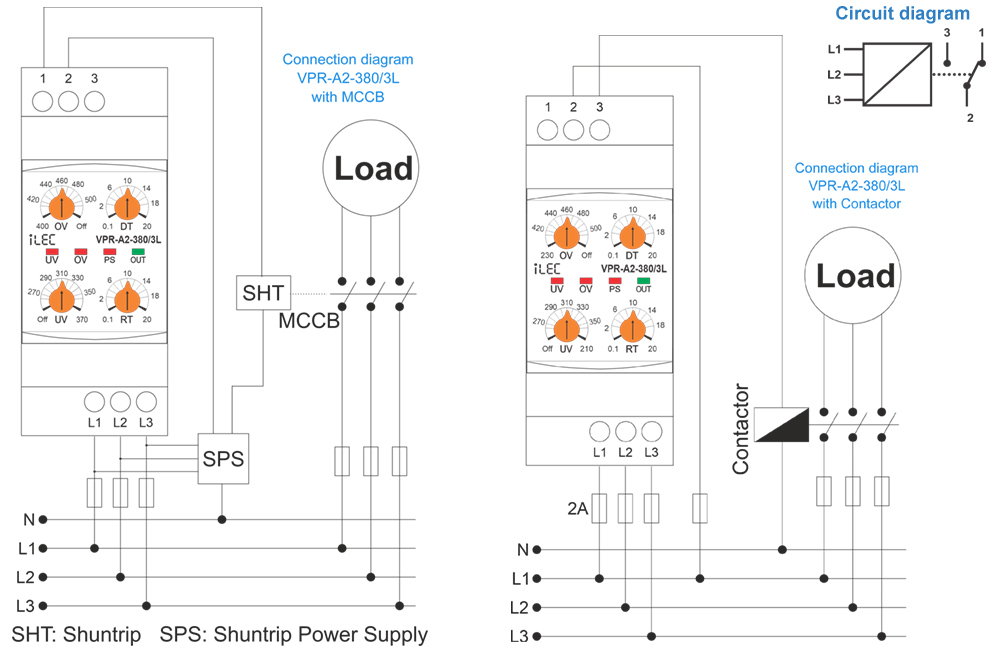
Typical connection diagram
Resources & Support
- Technical documents – Model VPR-A2-380/3L
- Reference Articles – Model VPR-A2-380/3L
- Pricing & Ordering – Model VPR-A2-380/3L
Review Relay iLEC RT6-S10-U
- Details
- Parent Category: product
- Category: Multifunction Protection Relay